Showing posts with label PeopleCode. Show all posts

Monday, November 7, 2016

Why My Static Image On PeopleSoft Fluid Page Is Not Responsive?

Howdy Coders!

Have you tried adding a static image on the fluid page and noticed that your image was not responsive to a small form factor device?

If you have that problem, read on...

So, I added a static image to the fluid page (For sample purposes, I am just using the header logo from Sign In page), That's the easy part!


Save the page, and test it on a browser.

Here is what it looks like on my iPhone on landscape mode.  Looks good!
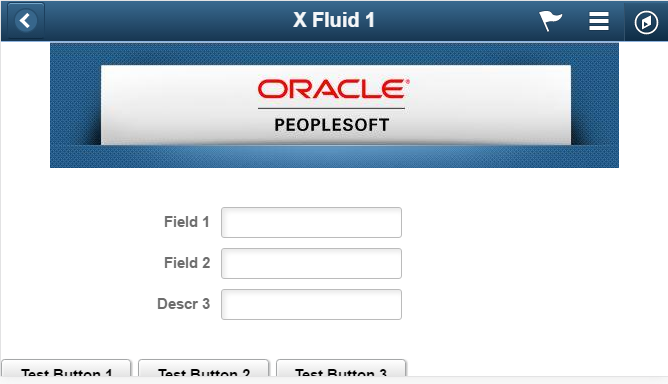
 

Now flip the phone to a portrait mode,  TA-DAH!! What happened with the logo.  DOH!!, it did not resize!  What's wrong!


Here is what I found.

The static image by default is using a stylesheet class called ps-staticimg.  However, the default PSSTYLDEF_FMODE.CSS does not have a reference of ps-staticimg classThat's the problem!


All you need to do if you are facing this problem is to add ps-staticimg class with an attribute max-width = 100% yourself;   How do I do that?  The simplest way is to add an HTML area to the top of your fluid page and add the CSS style class in it.


That's what you need.  Now let's test the page on the iPhone again on Portrait Mode.

Wait for it...Ah! That looks better!


Now you have a simple trick how to get your image to work correctly on your fluid page.

Happy Coding!


Wednesday, October 12, 2016

Pausing Peoplecode Processing Using Java Class

Honestly, in my years and years of developing in PeopleSoft, I probably used this java class tips to pause my peoplecode processing time twice as far as I remember.

When I need it, this one comes pretty handy:

GetJavaClass("java.lang.Thread").sleep(1000);

Note: 1000 is in milliseconds, which equates to 1 second sleep time.

Monday, October 10, 2016

HELP! My Custom Fluid Page NOT Rendering Correctly On My Phone

While PeopleSoft fluid or generally known as "Responsive Design" may be new to some but not to others, I thought I would share a little simple trick to get your custom fluid page to render correctly on a small form factor device, such as smart phone.

Building a fluid page needs a little bit of getting used to, but by far it is still a lot easier than building a responsive design web page from scratch. Thanks to PeopleTools for this handy tool, we can now build a "responsive design" page in minutes not hours.

After you built a "Hello World" fluid page from scratch, tested it on the browser, and everything looked good initially, you would think "WOW, I did it and woohoo!".

Sorry to pop your bubble, I will say don't get excited too fast. You are not done testing. Remember! why are you building a fluid page? What devices that most of your users will access your fluid page from?

One of the main reasons why you start building more fluid pages than classic nowadays is because you heard this phrase a lot "Think Mobile First".

So back to your testing exercise, browser testing is not enough, you need to test this in your mobile phone for a small form factor. If it looks good, then you can congratulate yourself and move on.

How do I know if it looks good or not? See my examples below:


The one on the left looks great and this is what you are hoping to see on your mobile phone too.

So, you start asking yourself, WHY?

Two screenshots below were captured from two fluid page source code. One on the left is good, one on the right is NOT.


Here is a solution for you. Go to the app designer and add these two lines of code in your page activate peoplecode.


Retest your new page now on your mobile phone. Congratulations! your page renders correctly.


Don't Forget...Think Mobile First!

Happy Coding...

Monday, April 11, 2016

How to get a beginning date and ending date of fiscal year with a current date

Here is a simple peoplecode to get a beginning and ending date of fiscal year with a current date
  
   Local string &sCurrYear = String(Year(%Date));
   Local date &dtLastDay = DateValue("06/30/" | &sCurrYear );
   Local date &dtAsOfDate = DateValue(DateTimeToLocalizedString(%Datetime, "MM/dd/") | &sCurrYear); /* You can use %Date instead */
   Local date dtFirstDay;
   
   If &dtAsOfDate < &dtLastDay Then
      &dtFirstDay = DateValue("7/1/" | String(Value(&sCurrYear) - 1));
      &dtLastDay = DateValue("06/30/" | &sCurrYear); /* for easy to read */
   Else
      &dtFirstDay = DateValue("7/1/" | &sCurrYear);
      &dtLastDay = DateValue("06/30/" | String(Value(&sCurrYear) + 1));
   End-If;

Tuesday, March 22, 2016

How To Get milliseconds Displayed in DateTime Via PeopleCode

In most cases, milliseconds may not matter in your coding, but in few cases, it could make a big difference.

As you know, when you are using %DateTime or %Time, the milliseconds shows .000000, so frustrating...

There are few ways you can do to remedy this issue, some use SQL to get a current_timestamp, some use a java class to get a server time, etc.

Here is one for peoplecode:

Local datetime &NewDateTime = DateTimeValue(Substring(String(%Datetime), 1, Len(String(%Datetime)) - 6) | Substring(String(%PerfTime), Len(String(%PerfTime)) - 5, Len(String(%PerfTime))));

Hope this helps and Happy Coding!

Tuesday, December 1, 2015

Dynamic Position Title from Jobcode vs Position Data

On a several different occasion, I was asked how we dynamically derive a position title from the position data table when the position number exists in the job data instead of from jobcode table.

So, I wrote this SQL to return emplID, empl record, and dynamic position title (derived from jobcode vs position data).

You can also make this SQL as record view and you can call it using peoplecode to return a dynamic position title you desire.

For this example, I am querying emplID: KU0010.

Note: replace {less than sign} with <
For some reasons, it keeps translating and displaying it to < (If anyone has suggestion to fix the dispay, please let me know.  I just don't have time to research it right now)

Additionally, I am running this in Oracle database, so sysdate will work just fine.  If you are using MSSQL database, you know what to do.

SELECT job.emplid 
 , job.empl_rcd 
 , CASE pos.descr WHEN '' THEN jobcd.descr ELSE pos.descr END 
  FROM ps_job job LEFT JOIN ( 
 SELECT J1.setid 
 , J1.jobcode 
 , J1.Descr 
  FROM ps_jobcode_tbl J1 
 WHERE J1.effdt = ( 
 SELECT MAX(effdt) 
  FROM ps_jobcode_tbl 
 WHERE setid = J1.setid 
   AND jobcode = J1.jobcode 
   AND effdt {less than sign}= SYSDATE)) jobcd ON jobcd.setid = job.setid_jobcode 
   AND jobcd.jobcode = job.jobcode LEFT JOIN ( 
 SELECT P1.position_nbr 
 , P1.descr 
  FROM ps_position_data P1 
 WHERE P1.effdt = ( 
 SELECT MAX(effdt) 
  FROM ps_position_data 
 WHERE position_nbr = P1.position_nbr 
   AND effdt {less than sign}= SYSDATE)) pos ON pos.position_nbr = job.position_nbr 
 WHERE job.effdt = ( 
 SELECT MAX(effdt) 
  FROM ps_job 
 WHERE emplid = job.emplid 
   AND empl_rcd = job.empl_rcd 
   AND effdt {less than sign}= SYSDATE) 
   AND job.effseq = ( 
 SELECT MAX(effseq) 
  FROM ps_job 
 WHERE emplid = job.emplid 
   AND empl_rcd = job.empl_rcd 
   AND effdt = job.effdt)
 AND job.emplid like 'KU0010';

Thursday, June 18, 2015

How to add ROWNUM in a Record View

Let's say that I have a table called Y_DISCUSSION with 6 existing columns.  Now, I want to add the 7th column that contains row number.  How do I do that?

It's pretty easy actually...

  • 1 - Create a Record View with 7 columns, the last column will be used as a row number.


  • 2 - Write the SQL Definition in this format below


  • 3 - Save and build the view
  • 4 - Run the view and get the result below

Now I have the rownum in the table, I can use the rownum in my selection criteria, such as rownum between 5 and 10.

Tuesday, April 21, 2015

Fix: Getting Error When Undeploying Secure Enterprise Search (SES) Search Definition

If you are getting the error below trying to undeploy search definition, then you may have the similar issue that I recently had after the database refresh.

Service Exception: ns2:CreatableAdminObjectFault : EQA-11000: The object with key "[name=PTPORTALREGISTRY_HRPRD]" and type "schedule" was not found. (262,1018) PT_SEARCH.SESIMPL.MESSAGE.AdminResponse.OnExecute  Name:AdminResponse  PCPC:1452  Statement:20
Called from:PT_SEARCH.SESIMPL.AdminService.OnExecute  Name:doService  Statement:848
Called from:PT_SEARCH.SESIMPL.AdminService.OnExecute  Name:delete  Statement:802
Called from:PT_SEARCH.SESIMPL.AdminService.OnExecute  Name:RemovePSFTSource  Statement:248
Called from:PTSF_DP_SBO_WRK.PTSF_UNDEPLOY_BTN.FieldChange  Statement:111 

Service Exception

There is a useful tutorial on how to resolve this sync issue.  If that solved your problem, great!

if not, continue reading, this may help you further.

After further checking, I found that the reason why I was getting an error while trying to undeploy the search definition is because the search definition deployed name in my PeopleSoft database did not exist in the SES database. 

Why? Because after the database refresh, the deployed name in my PeopleSoft Test database is now replaced with the one from the Production database.

Pay attention to the error message again.  Notice that the name has _HRPRD which is my Prod Database name.
 
When logged in to the SES Admin console, the name did not exist and the correct name should be PTPORTALREGISTRY_HRSTG.

Service Exception: ns2:CreatableAdminObjectFault : EQA-11000: The object with key "[name=PTPORTALREGISTRY_HRPRD]" and type "schedule" was not found. (262,1018) 

Okay, here is to fix it.

We need to change the deployed name inside the PTSF_DEPLOY_OBJ table.

First , I did a quick select all the search definition deployed names that end with _HRPRD

Note: HRPRD is the database name.  Yours will be different.

Select * from PS_PTSF_DEPLOY_OBJ where ptsf_deployed_name like '%HRPRD'

I got one result:


Next, I updated all the deployed name and replace _HRPRD with _HRSTG

Update PS_PTSF_DEPLOY_OBJ set ptsf_deployed_name = substr(ptsf_deployed_name, 1, length(ptsf_deployed_name) - 5) || 'HRSTG' where ptsf_deployed_name like '%HRPRD'

After I committed and I ran the select for the new name, I got the following result


Lastly, I went back to Main Menu > PeopleTools > Search Framework > Administration > Deploy/Delete Object, selected PTPORTALREGISTRY search definition and clicked "Undeploy" button.

Result: HOORAY!! No more error message.

Action Plan: Talk to the DBA to restore PS_PTSF_DEPLOY_OBJ after the DB refresh so you won't have to do this again for every refresh.

Hope this helps.

Wednesday, April 16, 2014

What the heck is going on with my (Approval Workflow Engine) AWE????

Yes, that is the question that has been haunting me for the past 24 hours.  AWE is not working!

The symptoms are:
1. I am getting errors below when initiating any AWE.
  • "Optimistic lock exception at %1.  Please refresh the page try the same operation again. (18081,1009) EOAW_CORE.Utils.OnExecute  Name:ThrowOptimisticLockException  PCPC:19812  Statement:511The problem also occurs when the counter in the table EOAW_IDS is incorrect."
  • at Approval process instance (Id = 'JobOpening', Definition ID = 'BYU_Hiring_Mgr_Recruiter', Effective date '1901-01-02', Thread id '48213') (18081,1056):10:1, Step nbr 1 (18081,1058) EOAW_CORE.ENGINE.DefStepInst.OnExecute  Name:Activate  PCPC:9660  Statement:143
2. Status monitor shows old workflow steps.

After poking around some codes and debugging them, I finally found that USERINST_ID and STEPINST_ID counter in the EOAW_IDS table are out of sync with the transactional tables: EOAW_USERINST and EOAW_STEPINST.

So, here is the solution:

Update ps_eoaw_ids set eoawcounter = (Select max(eoawstep_instance) + 1 from PS_EOAW_STEPINST) where eoawcountername = 'STEPINST_ID';

Update ps_eoaw_ids set eoawcounter = (Select max(eoawustep_inst_id) + 1 from PS_EOAW_USERINST) where eoawcountername = 'USERINST_ID';


Tuesday, October 22, 2013

Get the last day of the month with PeopleCode!

One nice thing to write the function to get "the last day of the month" in PeopleCode is that there is no restriction with the database platform.

Here is the easy how to:

   Local integer &year = Year(%Date);
   Local integer &month = Month(%Date);
   
   /* Get the last day of the month */
   If &month < 12 Then
      &last_day = Date3(&year, &month + 1, 1) - 1;
   Else
      &last_day = Date3(&year + 1, 1, 1) - 1;
   End-If;

Wednesday, October 2, 2013

Ez way to mask value in peoplecode

You can use this one line of code to mask sensitive data such as social security, bank account, etc.

Local string &_value = "123456789"; 
Local string &_masking_char = "*"; /* masking character */
Local integer &_digit_display = 4; /* number to display */
Local string &_new_value;

&_new_value = Rept(&_masking_char, Len(&_value) - &_digit_display) | Substring(&_value, (Len(&_value) - &_digit_display) + 1, Len(&_value));

Result:
&_new_value is *****6789


Get the First & Last Day of The Month In Oracle

Oracle figures if we can get the last day of the month using its handy LAST_DAY function, we should be able to figure out the first day, right?

Yep, here is one of many ways to get the first and last day of the month in Oracle.

Select  (last_day(:1)  - TO_CHAR(last_day(:1), 'DD')) + 1 as First_Day, last_day(:1) as last_Day from dual

Replace bind :1 to the actual date, then you get the result below:


Friday, July 5, 2013

Boring or Not So Boring Page, You Decide!


I decided in one of my recent developments to use jQuery in Peoplesoft FAQ page for a sleeker and smoother GUI interaction rather than a boring standard peoplesoft page (you know what I meant ;).  I mainly used the accordion for the FAQs and auto complete for the keyword search.  There are at least more than one way to reference the jQuery library from your peoplesoft page, but I found using the HTML definition is quite simple and easy.

This is what the end result looks like:

  • Auto complete function will search all possible FAQs from the search box
  • The FAQ's answer will be revealed when the FAQ is clicked and the box will smoothly expand/collapse

Here is what I did...
  1. Go to jquery.com and download the jQuery v.1.9.1 and jQuery UI v1.10.3 (pick the version that applied to you)
  2. Open a new HTML definition and copy/paste the jQuery code into it and I saved it as Y_JQUERY (name whatever you desire)

  3. Open a new HTML definition and copy/paste the jQuery UI code into it and I saved it as Y_JQUERY_UI (name whatever you desire)

  4. Open a new HTML definition and write a jQuery script (find a lot of code samples in jquery website) and I saved it as Y_ACCORDION_JQUERY (name whatever you desire).

    Several things to note are the bind variables that I use as input parameters:
    • %Bind(:1) = FAQ data
    • %Bind(:2) = url reference to jQuery library
    • %Bind(:3) = url reference to jQuery UI library
    • %Bind(:4) = array of keyword for auto complete search

     
  5. Open a new HTML definition and write a javascript to build the url with appropriate query strings, such as Y_FAQ_ID to determine what FAQ to display from the FAQ setup (not included in this tutorial), RETURN_LNK to determine to return link (not included in this tutorial), and TAGS (the field name from the edit box#2 to get the keyword for the search)


  6. Create a page definition.  Add HTML #1 (FAQs page w/ jQuery Accordion Style), edit box field (search box), and HTML#3 (search button for auto complete)


    • HTML area #1
    •  Name the page field "TAGS" to the edit box #2
    • HTML area #3
  7. Finally, write the page peoplecode to put pieces together and let the magic happens here!


    That should be it!  Not too bad, huh!

Thursday, January 10, 2013

Disable Peoplesoft radio button using javascript

In my recent development, I need to disable one of three radio buttons based on a condition. The dilemma here is that a radio button is using the same field, so using field property displayonly = True or enabled = False won't work in this sense.

 How do I do this:
 

To something like this (note: catch up below is grayed out):


Here is a step by step work around to disable one radio button using a simple javascript.
  1. We need to set a page field name from the radio button properties.  I named this one "ADJ_CATCHUP".

  2. Place HTML area to the bottom of the page to make sure that the page had been fully rendered before the javascript being called)

  3. Assign Record and Field into the HTML area properties


  4. Create a new HTML definition
    Note: (I use bind variable so I can reuse this HTML code with a different field name or property(true/false)


  5. Place the peoplecode below where you need it.  In my case, I put it in the page activate.
    If &_has_paid_amounts  is True, then it will disable catch up radio button.  Otherwise, enable it.


  6. That should be it.

Friday, March 19, 2010

How to use SQLExec with a criteria using IN or NOT IN

SQLExec is one of the most powerful peoplecode command to execute your SQL statement. Of course, there are several other ways to accomplish the same thing, such as CreateSQL, GetSQL, etc...If you ask me what I prefer, it really comes down to whether I need to loop through multiple rows vs single row from table. If multiple rows, CreateSQL and GETSQL will do a fantastic job, otherwise SQLExec is very efficient in fetching single row data.

Now and then, you will use IN or NOT IN SQL criteria to fetch a row from table in peoplecode. This example will use SQLExec technique.

Let say you have a string of values like this: 'A','B','C'. You want to use insert this string as a parameter in the SQLExec.

Bad Example:

Local string &in_values = "'A','B','C'";
Local string &out_val;

SQLExec("Select min(field1) from ps_table_1 Where field1 NOT IN (:1)", &in_values, &out_val);
Result: Bad


Good Example:

Local string &in_values = "'A','B','C'";
Local string &sql_cmd;
Local string &out_val;
&sql_cmd = ("Select min(field1) from ps_table_1 Where field1 NOT IN (" &in_values ")";

SQLExec(&sql_cmd, &out_val);


Result: Good


Happy Coding... :)

Thursday, February 18, 2010

Cool Trick! Dynamic Prompt Table Using PeopleCode

Prompt table is used frequently in peoplesoft pages to eliminate human input error to the database. It is simple and easy to use for end users. Most of the prompt tables are displaying same results to all users from the underline table or view. However, there is time when you need to display different result based on a page/field condition, a previous field selection, or perhaps a different group of users. Can we do this?

YES! Have you heard of using dynamic view and sqltext in peoplecode? If you have not, then this maybe useful for you.

The cool thing about using a sqltext in peoplecode is to override the sql object in your view. First, you need to create a dynamic view that you will use as a prompt table. You may want to write a generic SQL in the view with all the fields you need to display in the search result.

Once you finished with creating dynamic view, then you can assign it as a prompt table edit. When the user click on the prompt table lookup from the page, it will display results from your generic SQL.

Now, in your peoplecode you can modify the generic SQL in the dynamic view by writing your own SQL with additional criteria using sqltext.
/* Update SQLText of the dynamic view */ RECORD_NAME.RECORD_FIELD.SqlText = "SELECT VAL1, VAL2 FROM PS_TABLE Where field_criteria = '" | &criteria_variable | "'";
Note:
1. Replace
RECORD_NAME, RECORD_FIELD, VAL1, VAL2, PS_TABLE, field_criteria with your own
2. Assign criteria value to
&criteria_variable

That's it, easy, huh!

Wednesday, February 10, 2010

Aha! BI Publisher - using XML element value in text form field options

This is exactly what I need!!! I spent hours trying to figure out how I can change background table cell using XML data element dynamically instead of using static colors.

This code below is to use XML data element value in the text form editor:

<xsl:value-of select="{XML_ELEMENT}">
Note: replace {XML_ELEMENT} above with the actual element tag in your XML.

Ok, now I know that I can use XML value in my text editor, then I can continue with shading background color in my table cell. I have fld_Y_XML_COLOR_1 as my XML element and its value as actual color name like "lightgrey" or RGB code like "#CCCCCC" (It works both ways).

Note: I am adding if statement below to only shade with a background color when the xml value exists. If xml value has null value, you end up with blackout cells.

<?if:fld_Y_XML_COLOR_1 != ''?> <xsl:attribute xdofo:ctx="block" name="background-color"> <xsl:value-of select="fld_Y_XML_COLOR_1"/> </xsl:attribute> <?end if?>
I have fun playing with it, so here is my end result: