Thursday, June 18, 2015

How to add ROWNUM in a Record View

Let's say that I have a table called Y_DISCUSSION with 6 existing columns.  Now, I want to add the 7th column that contains row number.  How do I do that?

It's pretty easy actually...

  • 1 - Create a Record View with 7 columns, the last column will be used as a row number.


  • 2 - Write the SQL Definition in this format below


  • 3 - Save and build the view
  • 4 - Run the view and get the result below

Now I have the rownum in the table, I can use the rownum in my selection criteria, such as rownum between 5 and 10.

Thursday, April 30, 2015

Ah! That's where the SQL Developer pathname for java.exe is!

I keep forgetting where the java.exe located in my Oracle client, so I left myself a note here ;)

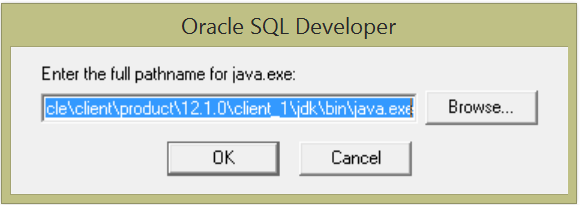
When opening a SQL Developer for the first time after the new client installed, you will get a prompt like this below:


The path is pretty simple, but if you have to install the Oracle client every once a while, finding the specific file can be frustrating.

Here it is:
C:\Oracle\client\product\12.1.0\client_1\jdk\bin\java.exe

Note: your Oracle home path may be different from mine above.

Tuesday, April 21, 2015

Fix: Getting Error When Undeploying Secure Enterprise Search (SES) Search Definition

If you are getting the error below trying to undeploy search definition, then you may have the similar issue that I recently had after the database refresh.

Service Exception: ns2:CreatableAdminObjectFault : EQA-11000: The object with key "[name=PTPORTALREGISTRY_HRPRD]" and type "schedule" was not found. (262,1018) PT_SEARCH.SESIMPL.MESSAGE.AdminResponse.OnExecute  Name:AdminResponse  PCPC:1452  Statement:20
Called from:PT_SEARCH.SESIMPL.AdminService.OnExecute  Name:doService  Statement:848
Called from:PT_SEARCH.SESIMPL.AdminService.OnExecute  Name:delete  Statement:802
Called from:PT_SEARCH.SESIMPL.AdminService.OnExecute  Name:RemovePSFTSource  Statement:248
Called from:PTSF_DP_SBO_WRK.PTSF_UNDEPLOY_BTN.FieldChange  Statement:111 

Service Exception

There is a useful tutorial on how to resolve this sync issue.  If that solved your problem, great!

if not, continue reading, this may help you further.

After further checking, I found that the reason why I was getting an error while trying to undeploy the search definition is because the search definition deployed name in my PeopleSoft database did not exist in the SES database. 

Why? Because after the database refresh, the deployed name in my PeopleSoft Test database is now replaced with the one from the Production database.

Pay attention to the error message again.  Notice that the name has _HRPRD which is my Prod Database name.
 
When logged in to the SES Admin console, the name did not exist and the correct name should be PTPORTALREGISTRY_HRSTG.

Service Exception: ns2:CreatableAdminObjectFault : EQA-11000: The object with key "[name=PTPORTALREGISTRY_HRPRD]" and type "schedule" was not found. (262,1018) 

Okay, here is to fix it.

We need to change the deployed name inside the PTSF_DEPLOY_OBJ table.

First , I did a quick select all the search definition deployed names that end with _HRPRD

Note: HRPRD is the database name.  Yours will be different.

Select * from PS_PTSF_DEPLOY_OBJ where ptsf_deployed_name like '%HRPRD'

I got one result:


Next, I updated all the deployed name and replace _HRPRD with _HRSTG

Update PS_PTSF_DEPLOY_OBJ set ptsf_deployed_name = substr(ptsf_deployed_name, 1, length(ptsf_deployed_name) - 5) || 'HRSTG' where ptsf_deployed_name like '%HRPRD'

After I committed and I ran the select for the new name, I got the following result


Lastly, I went back to Main Menu > PeopleTools > Search Framework > Administration > Deploy/Delete Object, selected PTPORTALREGISTRY search definition and clicked "Undeploy" button.

Result: HOORAY!! No more error message.

Action Plan: Talk to the DBA to restore PS_PTSF_DEPLOY_OBJ after the DB refresh so you won't have to do this again for every refresh.

Hope this helps.

Wednesday, April 16, 2014

What the heck is going on with my (Approval Workflow Engine) AWE????

Yes, that is the question that has been haunting me for the past 24 hours.  AWE is not working!

The symptoms are:
1. I am getting errors below when initiating any AWE.
  • "Optimistic lock exception at %1.  Please refresh the page try the same operation again. (18081,1009) EOAW_CORE.Utils.OnExecute  Name:ThrowOptimisticLockException  PCPC:19812  Statement:511The problem also occurs when the counter in the table EOAW_IDS is incorrect."
  • at Approval process instance (Id = 'JobOpening', Definition ID = 'BYU_Hiring_Mgr_Recruiter', Effective date '1901-01-02', Thread id '48213') (18081,1056):10:1, Step nbr 1 (18081,1058) EOAW_CORE.ENGINE.DefStepInst.OnExecute  Name:Activate  PCPC:9660  Statement:143
2. Status monitor shows old workflow steps.

After poking around some codes and debugging them, I finally found that USERINST_ID and STEPINST_ID counter in the EOAW_IDS table are out of sync with the transactional tables: EOAW_USERINST and EOAW_STEPINST.

So, here is the solution:

Update ps_eoaw_ids set eoawcounter = (Select max(eoawstep_instance) + 1 from PS_EOAW_STEPINST) where eoawcountername = 'STEPINST_ID';

Update ps_eoaw_ids set eoawcounter = (Select max(eoawustep_inst_id) + 1 from PS_EOAW_USERINST) where eoawcountername = 'USERINST_ID';


Tuesday, October 22, 2013

Get the last day of the month with PeopleCode!

One nice thing to write the function to get "the last day of the month" in PeopleCode is that there is no restriction with the database platform.

Here is the easy how to:

   Local integer &year = Year(%Date);
   Local integer &month = Month(%Date);
   
   /* Get the last day of the month */
   If &month < 12 Then
      &last_day = Date3(&year, &month + 1, 1) - 1;
   Else
      &last_day = Date3(&year + 1, 1, 1) - 1;
   End-If;

Wednesday, October 2, 2013

Ez way to mask value in peoplecode

You can use this one line of code to mask sensitive data such as social security, bank account, etc.

Local string &_value = "123456789"; 
Local string &_masking_char = "*"; /* masking character */
Local integer &_digit_display = 4; /* number to display */
Local string &_new_value;

&_new_value = Rept(&_masking_char, Len(&_value) - &_digit_display) | Substring(&_value, (Len(&_value) - &_digit_display) + 1, Len(&_value));

Result:
&_new_value is *****6789


Get the First & Last Day of The Month In Oracle

Oracle figures if we can get the last day of the month using its handy LAST_DAY function, we should be able to figure out the first day, right?

Yep, here is one of many ways to get the first and last day of the month in Oracle.

Select  (last_day(:1)  - TO_CHAR(last_day(:1), 'DD')) + 1 as First_Day, last_day(:1) as last_Day from dual

Replace bind :1 to the actual date, then you get the result below: